
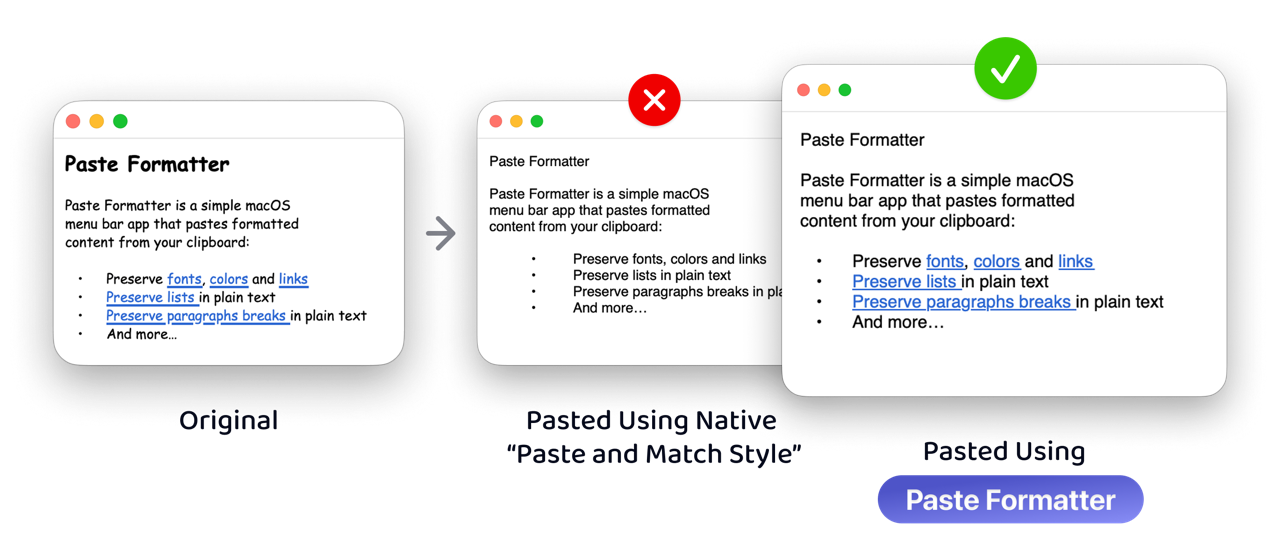
Paste without losing links, lists, or paragraph breaks.
Paste formatted clipboard content into the active app while choosing whether to preserve fonts, colors, links, lists, and paragraph breaks.

$4.99 one-time purchase macOS 13 or later
A cleaner paste, without losing what matters
Paste Formatter sits in your menu bar and gives you focused controls for cleaning rich text before it reaches the app you are working in.

-
Paste rich text while choosing whether fonts, colors, and links are preserved or removed.
-
Paste as plain text while keeping paragraph breaks, lists, and indentation readable.
-
Paste in any app from the menu bar or with a configurable global keyboard shortcut.
-
Optionally launch at login so formatted pasting is always available when you need it.
Frequently Asked Questions
How can I paste (and match style) while preserving links?
Use Paste Formatter when you want pasted content to fit the destination app but still keep useful structure like links.
Instead of converting everything to plain text, Paste Formatter can clean rich text while preserving links, lists, paragraph breaks, and other content you choose to keep.
What is Paste Formatter and how does it work?
Paste Formatter helps you paste cleaner text without losing useful structure like links, lists, paragraph breaks, and indentation.
You can remove unwanted fonts and colors, preserve the formatting you still need, and paste from the menu bar or with a global keyboard shortcut.
It reads the current clipboard, creates a cleaned version based on your settings, temporarily places that version on the clipboard, and then pastes into the active app.
What does “Paste and Match Style” do, and how is it different from Paste Formatter?
“Paste and Match Style” pastes text using the formatting of the destination app. It is useful when you want plain text, but it often removes more than unwanted styling. Links, list structure, and useful spacing can disappear too.
Paste Formatter gives you more control. Paste Formatter can clean rich text while preserving links, lists, paragraph breaks, and other content you choose to keep.
Why does Paste Formatter require Accessibility permission?
Paste Formatter needs Accessibility permission so it can paste into the active app after preparing the cleaned clipboard content.
What formatting can be preserved or removed when pasting rich text?
When pasting into a rich text field with Paste Formatter, you can choose to:
- Preserve or remove fonts
- Preserve or remove text colors
- Preserve or remove links
What formatting can be preserved when pasting plain text?
When pasting into a plain text field with Paste Formatter, you can choose to:
- Preserve paragraph breaks
- Preserve lists and their indentation
How do I paste with a global keyboard shortcut and how can I change it?
Paste Formatter can paste from the menu bar or through a configurable global keyboard shortcut.
To change it, open Paste Formatter from the menu bar and choose “Change Keyboard Shortcut…”.
What is “Launch at Login” and why do I need it?
“Launch at Login” starts Paste Formatter automatically when you sign in to your Mac.
It keeps formatted pasting available from the menu bar and your configured shortcut without opening the app manually first.
Does Paste Formatter work with clipboard managers?
Paste Formatter temporarily places formatted content on the clipboard before pasting, so your clipboard manager may capture an extra item.
If that happens, configure your clipboard manager to ignore Paste Formatter.
What is Paste Formatter's privacy policy and how is my data used?
Paste Formatter does not collect, transmit, sell, or share your clipboard content, settings, usage, or personal data.
Clipboard content is processed locally on your Mac only when you use the app.
I have an issue or suggestion. What should I do?
If you have an issue, first make sure Paste Formatter is updated to the latest version. You can do this through the Mac App Store. Then check the existing GitHub issues to see whether someone already reported the same issue.
If not, create a new issue on GitHub. Include as much information as possible, including Paste Formatter's settings, steps to reproduce, the content you are trying to paste, the expected outcome, and the actual outcome.
If you have a suggestion, create a new issue on GitHub, too.